 cPanel/WHM Plugins
PrimeOps Ultimate
One-click server hardening, performance and operations for cPanel/WHM — verify, then enable only what is missing.
- WHM & cPanel
- Encrypted code
- Signed packages
- English & Arabic
Price
$30 / year
One server, one year of updates and support. Renew whenever you like.
- Protected, signed package — verified before install
- Move the license to a new server yourself
- Full uninstall from the plugin or the command line
One command, as root
The installer checks your server, asks for your license key, verifies the signed package and installs it. The same command upgrades later.
# wget -O install.sh https://www.infinityinstaller.com/plugins/PrimeOps-Ultimate/install.sh && bash install.sh
# bash install.sh --uninstall
PrimeOps Ultimate in action
What PrimeOps Ultimate does
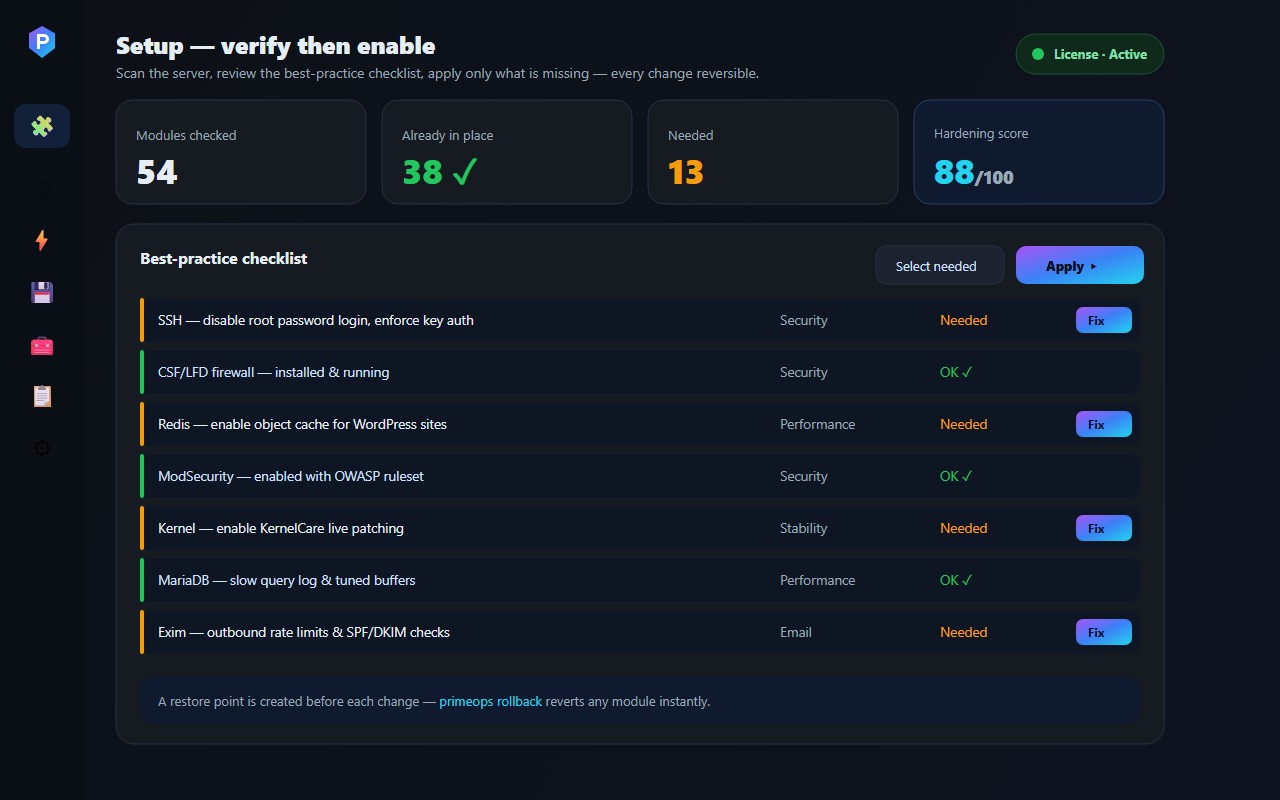
PrimeOps Ultimate turns cPanel & WHM into a full server operations center. It verifies the state of 54 best-practice settings across security, stability, performance, email, backup, services and monitoring — then enables only what is missing, backing up every change so it can be rolled back instantly.
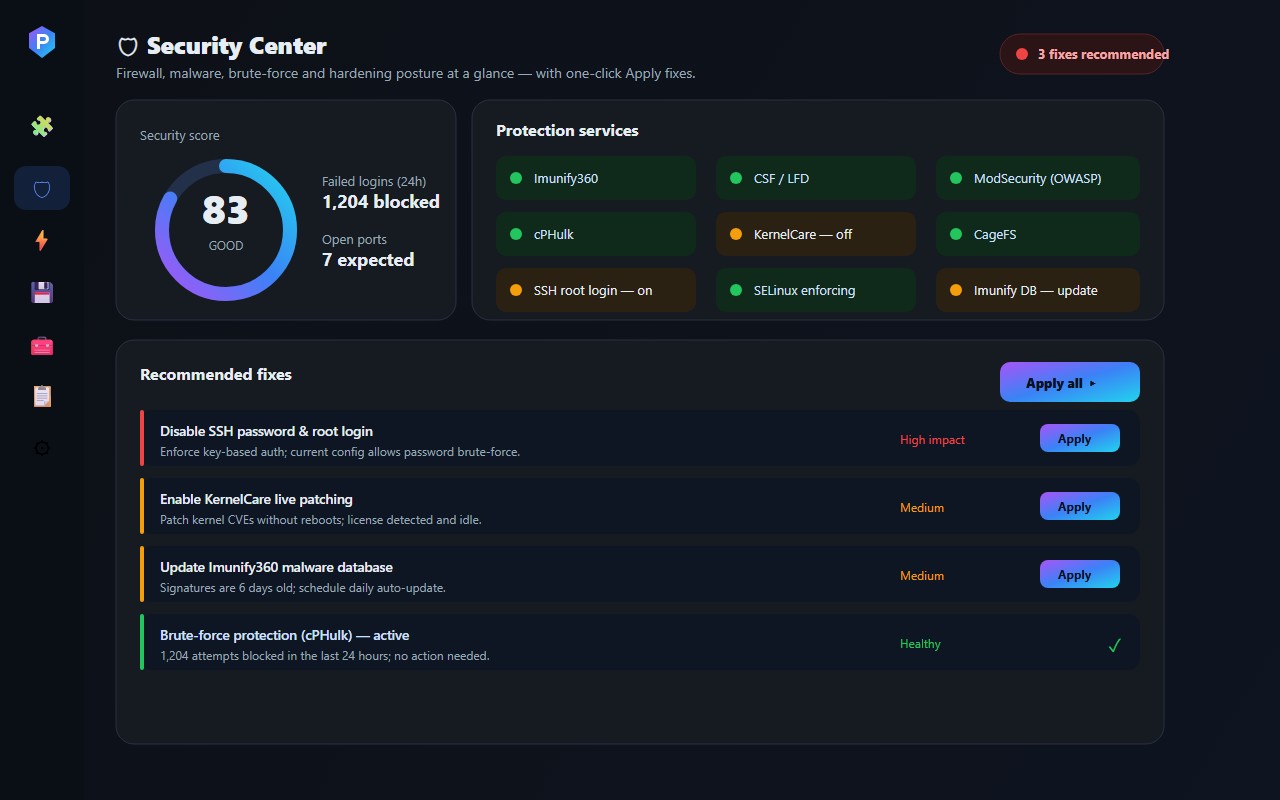
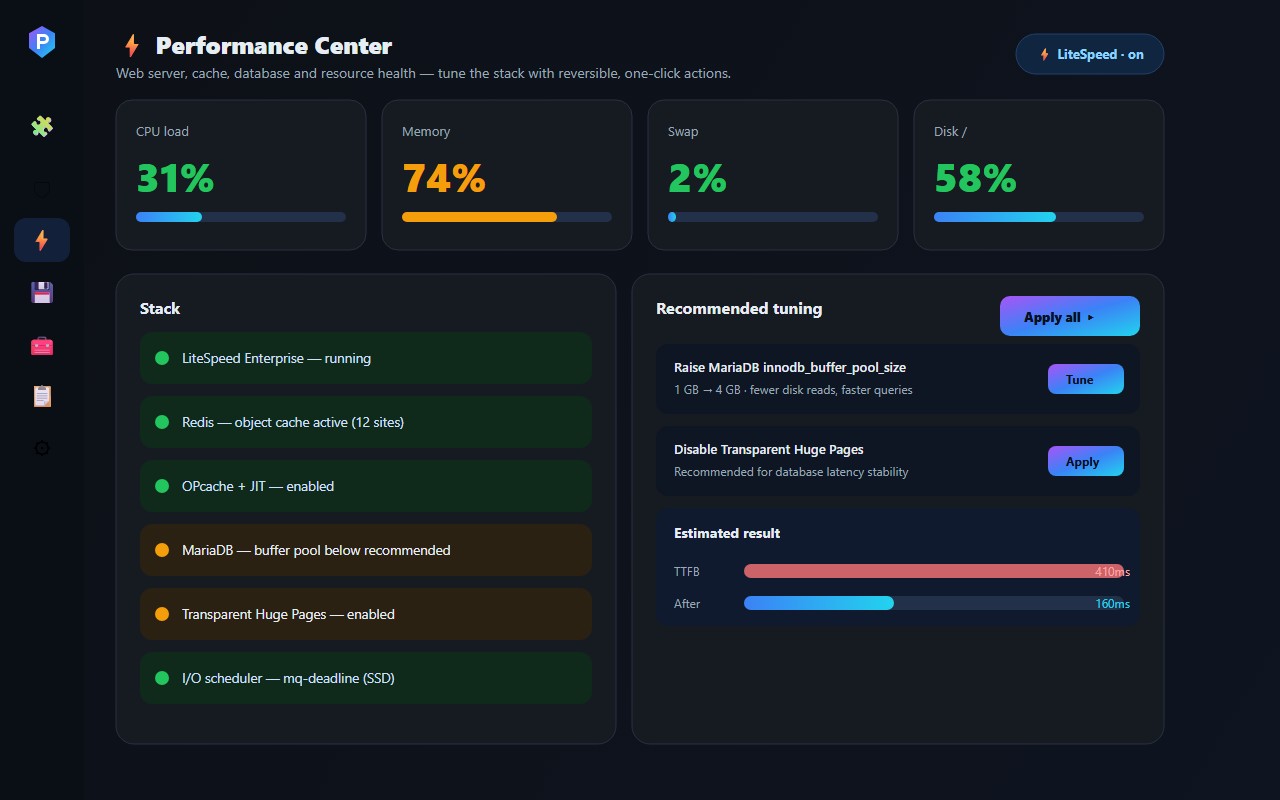
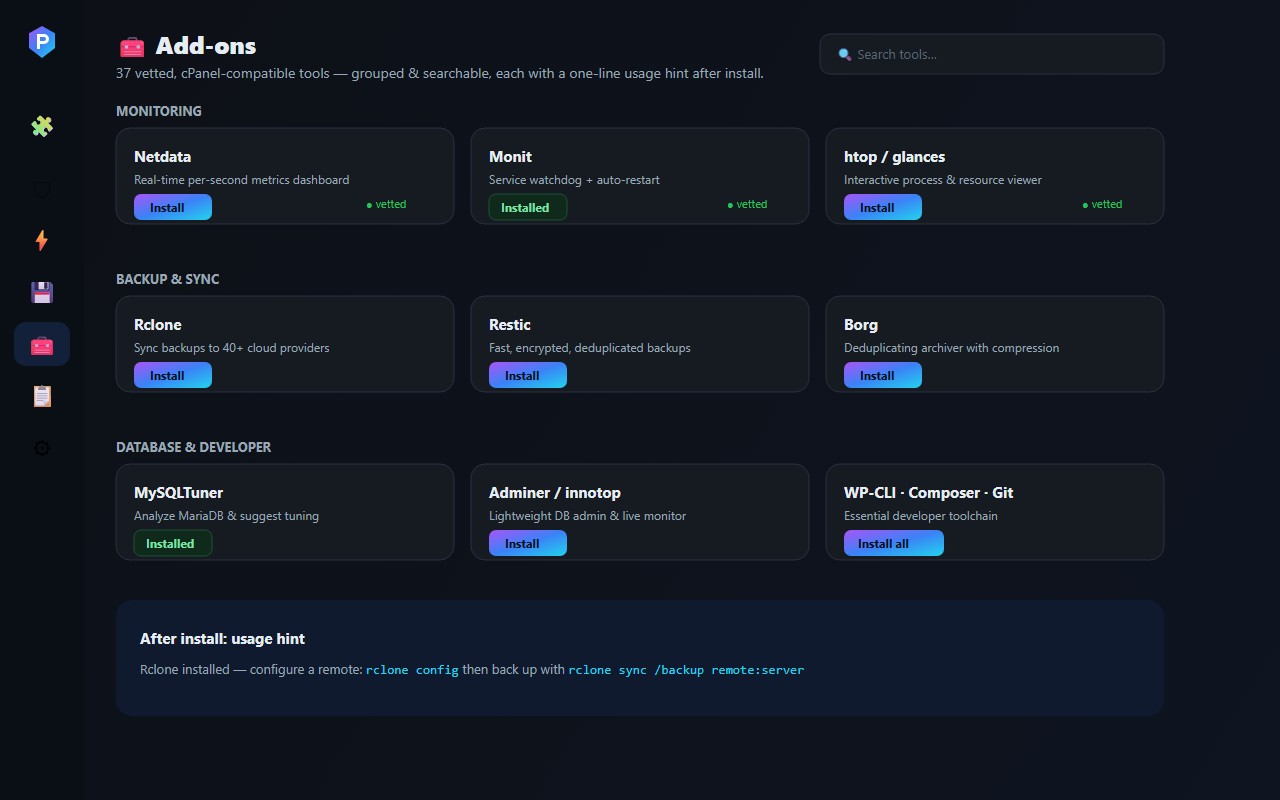
Three live centers — Security, Performance and Backup — show real status with one-click Apply fixes: firewall and malware posture, SSH hardening, LiteSpeed/Redis/MariaDB tuning, backup policy and disk health. A searchable library of 37 vetted, cPanel-compatible add-ons installs the tools you need, each with a short usage hint.
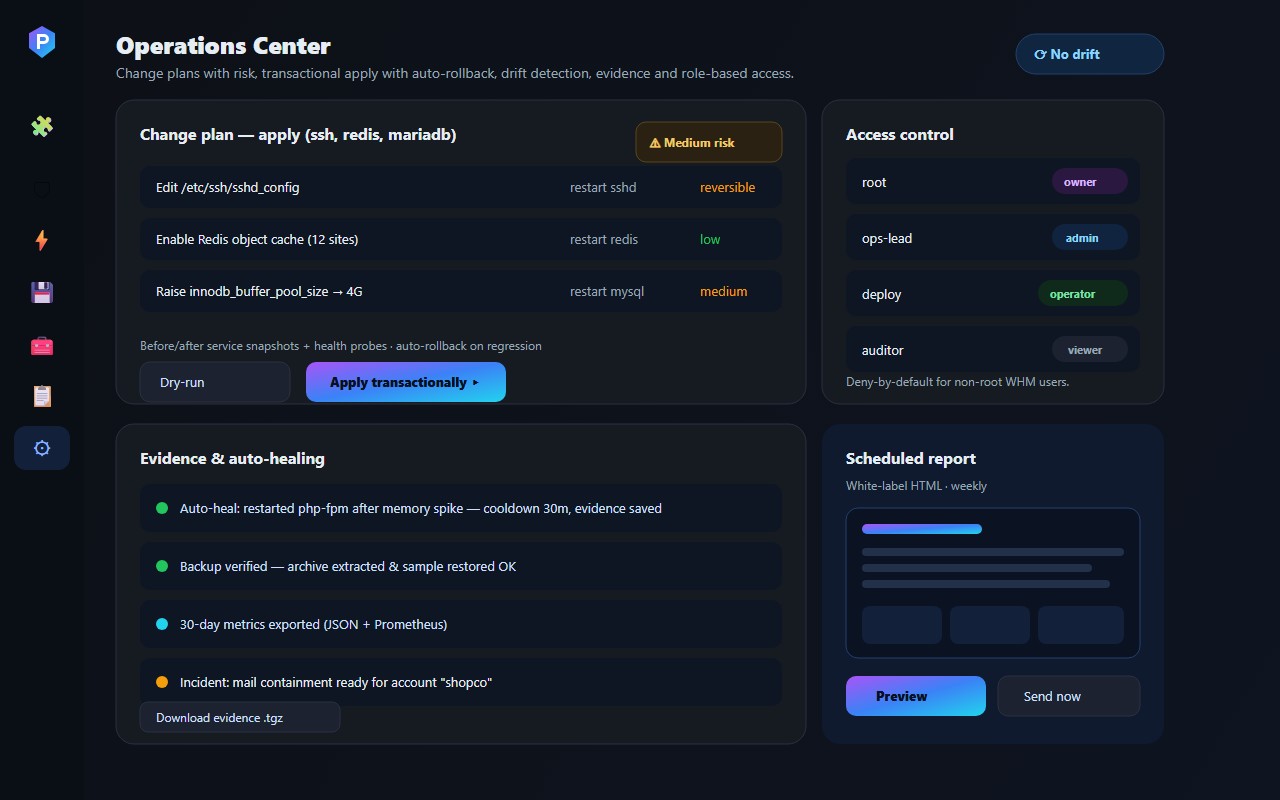
The Operations Center adds single-server change management: risk-rated change plans, transactional apply with before/after snapshots and automatic rollback on regression, drift detection, bounded auto-healing, role-based access (viewer/operator/admin/owner) and evidence — JSON history, 30-day metrics, Prometheus, backup verification and white-label reports.
Requirements
- cPanel & WHM on CloudLinux, AlmaLinux or Rocky Linux, with root access.
- EA-PHP 8.4 (ea-php84) with the ionCube Loader 15 — installed automatically.
- Bash 4+ and at least 100 MB free under /usr/local.
- Outbound HTTPS for licensing, update intelligence and alerts.
Features
- Verify → enable — 54 best-practice modules across Security, Stability, Performance, Email, Backup, Services and Monitoring; applies only what is missing, and every change is reversible.
- Security Center — with one-click Apply fixes.
- Performance Center — LiteSpeed, Redis, MariaDB, OPcache/JIT, load/memory/swap/disk, THP and I/O scheduler tuning through safe, reversible actions.
- Backup Center — policy, retention, destinations, last-backup age and disk health, with Apply fixes.
- 37 vetted add-ons — grouped and searchable (Netdata/Monit, Rclone/Restic/Borg, MySQLTuner/Adminer/innotop, WP-CLI/Composer/Git …) each with a usage hint after install.
- Operations Center — change plans show the affected files, services, impact and low/medium/high risk before anything is applied.
- Transactional apply — a global lock, before/after service snapshots, syntax/health probes and automatic rollback when a regression is detected.
- Desired state & drift — adopt the healthy baseline, watch for drift continuously, and repair only the drift you select.
- Evidence — JSON change history, 30-day metrics, Prometheus output, mail health, parallel HTTPS site checks, real backup verification and incident archives.
- Bounded auto-healing on a schedule with cooldown and evidence, plus outgoing-mail containment for a single cPanel account.
- Role-based access — viewer, operator, admin and owner; deny-by-default for non-root WHM users, behind cPanel AppConfig authentication.
- Native log viewer, alerts (Telegram/Slack/WhatsApp/Email) and white-label HTML/PDF reports — a fast, animated UI with zero external JavaScript libraries.
You may also like
Churn & Client Intelligence
Predict churn, understand every client, and act — risk scoring, Client 360, sentiment AI, retention playbooks and executive analytics for WHMCS.
Enterprise Email Template Testing PRO
Test, preview and score every WHMCS email before it reaches a client — deliverability analyzer, quality gates, A/B subjects and batch suites.
Email Verification Pro
Verify every client email before they use your services — client-area lock, reminders, deliverability intelligence, fraud signals and analytics for WHMCS.